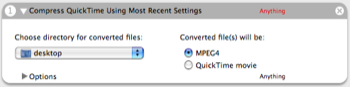
Function: Compresses QuickTime movies to MPEG-4 and places the files into the selected folder.
Author: Center Mid Software
Input: (Anything) QuickTime files
Output: (Anything)
Notes: Configure MPEG-4 compression settings in QuickTime Player before using this action. Warning: Make sure to pass files, not folders, to this action. The Filter Finder Items action, for example, could be used to make sure only QuickTime files are selected.
Update: Adds more flexible QuickTime compression features and is therefore renamed to Compress QuickTime Using Most Recent Settings.
I just released an ffmpeg version of my video conversion automator action. It supports conversion to flash video (flv) files.
rhettmaxwell.org/automator
Comment by Rhett Maxwell — September 11, 2006 @ 3:20 pm
I just downloaded it and tried it with automator. It works for me. Make sure you called the Import Action… method under the File menu.
Comment by Rhett Maxwell — July 30, 2006 @ 2:26 pm
Rhett Maxwell, i downloaded your action but it will not open in automator…?
Comment by aaron — July 9, 2006 @ 5:39 am
I’m working on a QuickTime automator action that will convert to any format. You can choose the format in automator and the destination. All files that are passed in will get converted to that format. It returns the input as the output, so you can easily batch convert to multiple formats in the same workflow.
quicktime export action
It won’t do flv, because quicktime pro doesn’t export to flv, however I am working on a ffmpeg version that will work the same.
Comment by Rhett Maxwell — June 28, 2006 @ 4:03 pm
azharahman,
I’m sorry I missed your post - with this action, the answer is yes. I’m now looking at using ffmpeg in a new action, but I’m not promising any timeframes yet. A nice app that uses this is iSquint.
Comment by Tim Matheny — May 17, 2006 @ 10:22 am