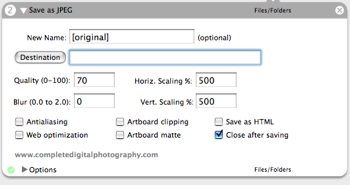
Function: Saves the current Illustrator document as a JPEG file. Provides all of Illustrator’s standard JPEG save options including HTML generation, scaling, blurring, and quality.
Author: Ben Long
Requires: Adobe Illustrator CS2
Input: Finder items
Output: JPEG file
Notes: Currently only supports CS2. If anyone needs a CS version, lemme know and I’ll get on it.

I need a batch converter from freehand to illustrator. The instructions by Adobe to convert them one by is not helpful when looking at a library of old files. Why can’t Adobe support this? Freehand used yo open illustrator files just fine..
Comment by katie — January 26, 2009 @ 1:53 pm
Dear Ben: I downloaded your program “Illustrator to JPEG”, but I can’t get it to work. I tried restarting my mac, and I tried putting the folder inside the “Illustrator” folder, inside applications. Could you please tell me what to do to make your file work. Thank you, Michael
Comment by Michael — January 6, 2009 @ 2:12 pm
Dear Sir,
I am working on Illustrator CS4. If i import file as jpg then the colorswhich are saved are very contrasting. And when I try to save from web and devices the file is so small that I cant even print it. If it prints its super pixelated. Please, Please, Please help me.
Thankyou Shweta Narang
Comment by Shweta — November 3, 2008 @ 4:56 am
Have you ever created a workflow that could convert Macromedia FreeHand files into EPSs, or even better, into Adobe Illustrator docs? The newspaper where I work has a huge library of FreeHand docs, and with the Associated Press switching to Illustrator, it would make my life a lot easier to have a routine that could automatically batch-convert those files. Sound like fun?
Comment by Ken Ellis — November 1, 2007 @ 9:35 am
Would it possible to make a converter from illustrator to PDF.
Comment by Batty@ — November 21, 2006 @ 10:37 am