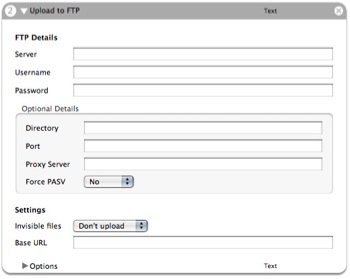
Function: Uploads files or folders to an FTP server.
Author: Peter Dekkers
Input: (Text) Files/folders or absolute paths to files as plain text arguments.
Output: (Text) Filenames of the uploaded files, prefixed by the entered Base URL.
Notes: New in this version: support for proxy servers and forced passive transfers. Warning: This action overwrites remote files without prompting. Includes three sample workflows.
Updates:
v1.4
- Fixed a bug with some servers with line endings being appended to filenames
Thanks Marcel Rivard!
v1.3 (skipped a version there, not sure why…)
- Fixed a recursion bug - Many thanks to Tom Davies!
If it helps any, I checked the Log and it says, “An error (255) occurred in Upload to http://FTP.” Not sure what error 255 is.
Comment by Russell — July 20, 2005 @ 12:19 pm
Another quick question–I’m trying to use this script behind an ftp proxy, and the ftp proxy server login format is like this:
Server: proxyserver.com (the proxy server) User Name: username@outsideserver.com password: password
I’ve tried connecting, but I keep getting a “Workflow Execution Failed” error. I can run Terminal and verify the ftp connections are good, but the workflow isn’t connecting. Any ideas on how I can debut this? I was wondering if the script you created can handle usernames like “username@outsideserver.com”.
Thanks, Russell
Comment by Russell — July 20, 2005 @ 12:17 pm
Great! Thanks.
Comment by Peter Dekkers — July 19, 2005 @ 11:35 am
Peter, just wanted to let you know the new script is working nicely. Thank you.
Comment by Russell — July 19, 2005 @ 8:43 am
A handy action to place right after this one in a workflow is the Make HTML Tags action.
http://www.automatorworld.com/2005/07/17/make-html-tags
Using it that way, you can easily post files on websites.
Comment by Peter Dekkers — July 17, 2005 @ 10:18 pm