Actions

Comments

6 Comments »

Pages: [2] 1 » Show All

  1. 6.

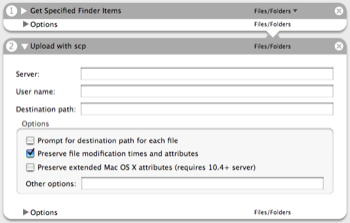
    The port can be changed by putting the appropriate scp command line option in “Other options”. For example, Put -P 2222 to use port 2222.

    Comment by Douglas Stebila — July 1, 2008 @ 6:25 pm

  2. 5.

    Is it possible to change the port used for this script? I have several servers that run ssh on a different port than the standard 22.

    Comment by Kevin Hansen — September 27, 2007 @ 3:47 pm

  3. 4.

    Is the return the finder items that were copied? If I add “send to trash” after scp the files are note getting deleted locally.

    Comment by Tryan — May 28, 2007 @ 10:27 pm

  4. 3.

    Any chance on updating it to allow the password to be added to the action? Using keygen, I could do this with the standard shell script action, but that doesn’t work with password prompts. I’d like to be able to distribute the action to some of our users & not have to set up a private/public pair in their shell.

    Comment by Niels Meersschaert — August 18, 2005 @ 10:52 am

  5. 2.

    scp is a secure copy protocol that is part of the ssh suite of tools. It’s generally a command-line Unix tool, and instead of using cp to copy files locally, you can use scp to copy files to/from remote servers.

    Comment by Douglas Stebila — July 25, 2005 @ 9:46 am

Pages: [2] 1 » Show All

RSS feed for comments on this post. TrackBack URI

Leave a comment

XHTML: You can use these tags: <a href="" title=""> <abbr title=""> <acronym title=""> <b> <blockquote cite=""> <cite> <code> <del datetime=""> <em> <i> <q cite=""> <strike> <strong>