Function: Compares the contents of any two folders and returns matching or unmatching files.
Author: Ben Long
Input: (Files/Folders)
Output: (files/Folders)
Notes: Compares any two folders and outputs your choice of all matching files, only matched files from either folder, or only different files from either folder. Also provides an option for ignoring extensions. I find this useful for comparing folders full of original images with folders of dupes that I’ve made and edited. The ability to ignore extensions lets you easily compare file names without worrying about whether you’re looking at JPEG, Photoshop or raw versions.
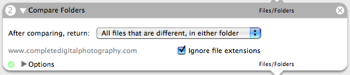
Hi, I’m using this command as part of a workflow that backs up data into an external hard drive. What I want is to check first if the copied files exist in the hard drive, and if not, to copy them. I tried running this several times selecting different options in the ‘after comparing return’ section but nothing seems to work. Any suggestions?
Comment by Lara — July 20, 2010 @ 3:36 am
I’m new to mac too and I followed message 3 (Import…) and it worked well.
You also need to put a command in automator (get selected finder items) before (ie above) the imported command that compares the folders. To do this drag and drop it from the list.
You then select the folders in Finder and then run automator.
Hope this makes sense? If not, maybe looking at an automator tutorial first would help you? Cheers, Gill
Comment by Gill — September 2, 2009 @ 12:53 pm
For one who is absolutely new to the Mac world and OSX; is in desperate need of a tool such as Compare Folders; and has downloaded and installed Compare Folders; are there any available instructions on how to run the program? I was able to bring up Automator Actions, but then have no clue on what to do next. Can you help me please?
Comment by Robert — February 9, 2009 @ 10:40 am
Hi – I’m an OSX (leopard) newbie. I downloaded this action (if this works as it says, it come standard!) and imported the action, but when I tried to open it, the error message says:
*** -[NSNull length]: unrecognized selector sent to instance 0xa0272020
Any hints? thanks.
Comment by George — November 6, 2007 @ 1:49 am
Deb – this action doesn’t have a log option, but the results are passed. You can view them with the “View Results” action.
Comment by Steve — January 15, 2006 @ 7:22 pm