


 News
News Site News
 Hints & Tips
 Opinion
 Workflows
 Actions
Actions


Illustrator to JPEG
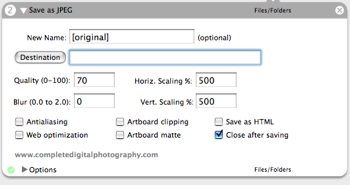
**Function:** Saves the current Illustrator document as a JPEG file. Provides all of Illustrator's standard JPEG save options including HTML generation, scaling, blurring, and quality.
**Author**: [Ben Long](mailto:admin@completedigitalphotography.com)
**Requires**: Adobe Illustrator CS2
**Input**: Finder items
**Output**: JPEG file
**Notes**: Currently only supports CS2. If anyone needs a CS version, lemme know and I'll get on it.
 Download
hi , I want such converter for CS please ,cause i don’t know how i can keep the same quality. I want to use an image, that i’ve made in Illustrator, fot my wallpaper, but i can’t save it in an format that i could use … and if i open it in Photoshop, the quality is gone …
Comment by hlin — November 2, 2005 @ 2:29 pm
Hi. As hlin said, It would be nice with a jpeg converter for CS too.
There is one thing I have to ask..
I recently made a picture in Illustrator CS where I had the measure of 12 cm lenght and
8 centimeters high. I exported the picture int jpeg but the picture got really huge.
10 times larger then the original 12*8 measurements. Did I do something wrong or does it
have something to do with the Illustrator coverter ?
Comment by Golga — December 13, 2005 @ 6:29 pm
I too would like to have a converter for CS.
Comment by MAlissa — August 16, 2006 @ 12:14 pm
Would like to know if you can create a converter from Illustrator to PDF.
Using (if possible) any preset you decide and bitmapped.
Thanks
Comment by Batty@ — November 21, 2006 @ 10:35 am
Would it possible to make a converter from illustrator to PDF.
Comment by Batty@ — November 21, 2006 @ 10:37 am
Have you ever created a workflow that could convert Macromedia FreeHand files into EPSs, or even better, into Adobe Illustrator docs? The newspaper where I work has a huge library of FreeHand docs, and with the Associated Press switching to Illustrator, it would make my life a lot easier to have a routine that could automatically batch-convert those files. Sound like fun?
Comment by Ken Ellis — November 1, 2007 @ 9:35 am
Dear Sir,
I am working on Illustrator CS4. If i import file as jpg then the colorswhich are saved are very contrasting. And when I try to save from web and devices the file is so small that I cant even print it. If it prints its super pixelated. Please, Please, Please help me.
Thankyou
Shweta Narang
Comment by Shweta — November 3, 2008 @ 4:56 am
Dear Ben:
I downloaded your program “Illustrator to JPEG”, but I can’t get it to work. I tried restarting my mac, and I tried putting the folder inside the “Illustrator” folder, inside applications.
Could you please tell me what to do to make your file work.
Thank you, Michael
Comment by Michael — January 6, 2009 @ 2:12 pm
I need a batch converter from freehand to illustrator. The instructions by Adobe to convert them one by is not helpful when looking at a library of old files. Why can’t Adobe support this? Freehand used yo open illustrator files just fine..
Comment by katie — January 26, 2009 @ 1:53 pm
Hi,
I’m starting to become very frustrated , id like to make high def/resolution images in photoshop but cant figure it out.I started using illustrator and think the lines look great in that program but dont know how to do anything else. The Question is, Can i draw something in illustrator and then bring it in to photoshop to color in, without losing the quality of the image.
Thanks so much for your time.
Comment by SB — December 18, 2009 @ 8:47 pm