


 News
News Site News
 Hints & Tips
 Opinion
 Workflows
 Actions
Headlines, Opinion

LinoType FontExplorer X Makes Me Happy
Many readers of this site are graphic design professionals, and I haven't met a one who doesn't have, to put it mildly, *font issues*. Recently I installed [LinoType FontExplorer X](http://www.linotype.com/fontexplorerX), and within five minutes of launch I came to the conclusion that it is, and I say this without reservation, the best font management application I have ever used. And it's free.
LinoType FontExplorer X (onward to be called the more blockbuster-sounding "LFX") is a bit of an enigma; it was clearly designed as a vehicle to sell typefaces, a la the iTMS, but one would expect a vendor to slap out a slow, buggy and ugly app to do this; they rarely have the resources, time or inclination to spend on quality.
LFX is none of these things; it is instead a prime example of a finely polished Cocoa app. Every UI element looks right, feels right and behaves right. It's fast, simple and intuitive, yet has depth of functionality when you need it.
LFX has all the basic features you would expect from a font manager, so I'll highlight some of the coolest ones:
* When fonts are grouped by familes, the preview pane shows all of them when that family is selected.
* Dragging a font or group of fonts to the Finder automatically creates (I can't friggin' believe this) a .zip archive (see screenshot below).
* Dragging a font preview to the Finder creates an image file of that preview (see screenshot)
* It supports [Growl](http://growl.info/).
* Two words: Smart Folders.
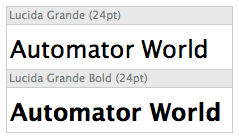
*Exported font preview image*

*The Prefs dialog has beautifully rendered icons. Note the export options...*
A few minor issues:
* When set to copy fonts into its own organization a la iTunes, LFX creates a separate folder for each font in a given family; they aren't grouped under one family folder. It's not a major issue (exported fonts are in a single folder), but it might bother those who are anal about their folder structure.
* The preview pane has only a font-size pop-up, not a scaling slider as with the OS text panel. There are key commands for scaling however.
* The LinoType Store can't be hidden. Understandable, but still annoying.
* LFX is not Applescript aware. This means, unfortunately, that creating Automator workflows and actions with it isn't currently possible.
In all honesty I haven't thought much about font management in the last 3-4 years; the existing applications for OS X have been mostly slow, buggy, expensive or overpowered for my needs, so I was turned off to the whole process. In those first five minutes of running LFX however, it located all the fonts on my hard drive, consolidated them to a central, organized folder and exorcized all the conflicting and duplicate fonts. And it was *fun*.
“And it was fun.”
Yes, I can only agree. Yay for FontExplorer X!
Comment by Peter Dekkers — November 10, 2005 @ 5:04 am
I can’t wait to try it! And if its that great, Extensis deserves a competitor (especially since they bought Font Reserve and are sitting on it, forcing you toward their painful Suitcase X1). Adobe deserves some Shame On You too! Exploiting the Mac community by taking away ATM Deluxe (no font management for OSX), and not letting Apple license Display Postscript.
Comment by Eddie S — November 10, 2005 @ 10:29 am
You forgot to mention, it’s also FREE!
Yeah, I’ve used this for a few months now, and it’s head and shoulders better than anything out there. *MUCH* better than FontBook. I had high hopes for FB, but alas, it was just a non-starter.
Comment by CM Harrington — November 10, 2005 @ 12:13 pm
No I didn’t, read my first paragraph :)
Comment by Steve — November 10, 2005 @ 12:21 pm
This isn’t usable for me yet because Quark and InDesign both hang when they try to auto-activate fonts using the provided plug-ins. Any advice?
Comment by JRH — November 10, 2005 @ 1:40 pm
I haven’t had a problem with the CS plugin; perhaps you have font corruption or conflicts? Try running the conflicts (View/Show Conflicts) and the cleaning/cache tools.
Comment by Steve — November 10, 2005 @ 3:53 pm
This is the first program I found that can scan my entire font archive 44,000 fonts!!!
Comment by TRRosen — November 11, 2005 @ 5:00 pm
I thought this was a cool app too. It definatly won’t solve all your problems, but it is a nice toy.
Comment by Reader — January 9, 2006 @ 1:10 am
The only additional feature that I would like to see implemented is the ability to rate fonts in a more efficient manner. The current right-click > my rating is a bit cumbersome. Where’s the inline drag n’ rate functionality?
Comment by Dimode — October 2, 2006 @ 10:44 am
As a graphic designer I’ve accumlated a large archive of various typefaces. The problem is that it takes time to scroll through them and find what I’m looking for. I keep meaning to separate them into categories but to date I’ve just never got around to it. I’m going to take a look at LFX and see what it can do to help me find typefaces for my graphic designs.
Comment by GrafxExtreme — December 13, 2006 @ 12:18 am
I found it very useful, didnt have everything but it was pretty good
Comment by Nathan S. — January 4, 2007 @ 4:46 pm
Yes very intresting think I join in.
Comment by John — January 18, 2007 @ 8:11 am
Will certainly take a closer look at LFX, looks pretty cool
Comment by Bill Corkin — April 25, 2007 @ 4:45 pm
LFX looks like a decent font tool
Comment by Erik — June 6, 2007 @ 2:27 pm
And what about new version?
Comment by iMax — July 6, 2007 @ 8:11 am
How can one set up multiple users on a single OSX system in FontExplorer with loading fonts for each user individually?
Comment by Dennis — October 24, 2007 @ 4:34 pm
Cool Tool. I might try it.
Comment by Resell Rights — November 2, 2007 @ 5:21 pm
gr8 tool thanks
Comment by celebs — July 21, 2008 @ 9:06 am