


 News
News Site News
 Hints & Tips
 Opinion
 Workflows
 Actions
Headlines, Opinion

LinoType FontExplorer X Makes Me Happy
Many readers of this site are graphic design professionals, and I haven't met a one who doesn't have, to put it mildly, *font issues*. Recently I installed [LinoType FontExplorer X](http://www.linotype.com/fontexplorerX), and within five minutes of launch I came to the conclusion that it is, and I say this without reservation, the best font management application I have ever used. And it's free.
LinoType FontExplorer X (onward to be called the more blockbuster-sounding "LFX") is a bit of an enigma; it was clearly designed as a vehicle to sell typefaces, a la the iTMS, but one would expect a vendor to slap out a slow, buggy and ugly app to do this; they rarely have the resources, time or inclination to spend on quality.
LFX is none of these things; it is instead a prime example of a finely polished Cocoa app. Every UI element looks right, feels right and behaves right. It's fast, simple and intuitive, yet has depth of functionality when you need it.
LFX has all the basic features you would expect from a font manager, so I'll highlight some of the coolest ones:
* When fonts are grouped by familes, the preview pane shows all of them when that family is selected.
* Dragging a font or group of fonts to the Finder automatically creates (I can't friggin' believe this) a .zip archive (see screenshot below).
* Dragging a font preview to the Finder creates an image file of that preview (see screenshot)
* It supports [Growl](http://growl.info/).
* Two words: Smart Folders.
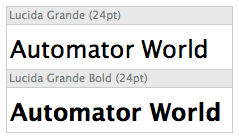
*Exported font preview image*

*The Prefs dialog has beautifully rendered icons. Note the export options...*
A few minor issues:
* When set to copy fonts into its own organization a la iTunes, LFX creates a separate folder for each font in a given family; they aren't grouped under one family folder. It's not a major issue (exported fonts are in a single folder), but it might bother those who are anal about their folder structure.
* The preview pane has only a font-size pop-up, not a scaling slider as with the OS text panel. There are key commands for scaling however.
* The LinoType Store can't be hidden. Understandable, but still annoying.
* LFX is not Applescript aware. This means, unfortunately, that creating Automator workflows and actions with it isn't currently possible.
In all honesty I haven't thought much about font management in the last 3-4 years; the existing applications for OS X have been mostly slow, buggy, expensive or overpowered for my needs, so I was turned off to the whole process. In those first five minutes of running LFX however, it located all the fonts on my hard drive, consolidated them to a central, organized folder and exorcized all the conflicting and duplicate fonts. And it was *fun*.