


 News
News Site News
 Hints & Tips
 Opinion
 Workflows
 Actions
Actions


Upload to FTP 1.5
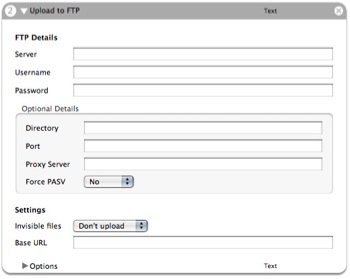
**Function:** Uploads files or folders to an FTP server.
**Author**: [Peter Dekkers](mailto:ftp_workflow@editkid.com)
**Input**: (Text) Files/folders or absolute paths to files as plain text arguments.
**Output**: (Text) Filenames of the uploaded files, prefixed by the entered Base URL.
**Notes**: New in this version: support for proxy servers and forced passive transfers. Warning: This action overwrites remote files without prompting. Includes three sample workflows.
**Updates**:
v1.4
- Fixed a bug with some servers with line endings being appended to filenames
Thanks Marcel Rivard!
v1.3 (skipped a version there, not sure why...)
- Fixed a recursion bug - Many thanks to Tom Davies!
 Download
Oh you just put the images into a folder locally and upload the folder to the server, thus creating it on the server.
Does that make more sense? Feel free to e-mail me your workflow at automatorworld.com[at]editkid.com and I’ll have a quick look?
Comment by Peter Dekkers — January 5, 2006 @ 1:17 pm
Oh sorry, I just repeated myself there. I got confused by the order of the comments. Please disregard my previous comment ;’)
Comment by Peter Dekkers — January 5, 2006 @ 1:20 pm
This is great!
I had the same problems as Miller & Morgan but changed force PASV to yes & works fine :)
Comment by Jono — January 19, 2006 @ 4:54 am
If you have v1.4 installed, please upgrade to v1.5. Due to carelessness a few input fields got disabled in 1.4.
Comment by Peter Dekkers — January 21, 2006 @ 6:06 am
Thanks, installed.
I created a custom workflow using the ‘Upload to dropbox.workflow’. Will I need to update my workflow with the new version, or will simply installing the ‘Install Upload to FTP’ package be enough?
Comment by Jono — January 22, 2006 @ 1:56 am
Hi Jono. Simply installing should be enough, yep.
Comment by Peter Dekkers — January 25, 2006 @ 4:53 am
[…] So at my day-job I’ve been fiddling a bit with Apple’s “Automator” tech to try and improve our imaging workflow. Today it occurred to me that maybe it could do me some good also. So I played around a little bit until I discovered this extremely cool Automator action called Upload To FTP – it’s fantastic, I made a little applet which will upload to my blog whenever I save something to my blogging folder on my machine – in practice that means, I find the picture I want to show you, do a little photoshop work to it as needed, hit one key, and boom it’s on my server! […]
Pingback by Automator geekery | Charley’s Photography Blog — March 11, 2006 @ 4:07 pm
[…] And there are many actions and workflow available : like the very usefull Upload to FTP from Automator World. MacOSX productivity Tool […]
Pingback by Bruno’s blog » Blog Archive » OSX productivity tool : Automator — April 11, 2006 @ 8:05 am
when i run this it start to move the file then the upload fails on the server has the name of the file but not data?
Comment by jim raines — May 25, 2006 @ 8:16 am
To the developer: the action’s Version field still reads 1.1 when viewed in the Finder. Minor quirk, really.
Comment by Eric3 — June 3, 2006 @ 7:35 pm
i can´t get this to work at all.. I´ve tried every possible path and setting… dont even get any error handling. any ideas?
Comment by mos — July 4, 2006 @ 10:07 am
It owrk, great! BUT… .txt files when uploaded do not appear to be fully readable. We need an additional function to set priv;leges on uploaded files.
Anyone else have this problem. I’ve tried loads of different ISP accounts and still find .txt files are ‘inaccessible’
Comment by James Rothschild — September 21, 2006 @ 8:47 am
Hello, I can’t get this workflow working properly. Everytime I try to upload something to my FTP I always get this error “FTP Upload Error Could not upload file: http://hem.bredband.net/b333989/Pics/test.png”
Can somebody tell me why, I really want this workflow to work!
Comment by mptre — October 7, 2006 @ 1:20 pm
Peter, very good of you to be so responsive to questions…
My wife wants to upload voice recordings, stored in iTunes, to a transcription service. Any ideas on how to set up actions “upstream” from yours, so that she can highlight songs in iTunes, then pass those selections to your action?
Thanks very much in advance.
Comment by Paul DuV — November 11, 2006 @ 10:35 pm
[…] Automator World : Archive » Upload to FTP v1.5 […]
Pingback by Synovian » Blog Archive » Awesome Automator Script — January 14, 2007 @ 2:09 pm
Very cool. Would love to see the option to have a email generated stating that the following files have been uploaded to this ftp site. As a confirmation.
Comment by Terry — March 20, 2007 @ 11:22 am
had a little struggle with my firewall getting started, but once I got out of my own way, it worked great. thanks!
Comment by Dwight — May 29, 2007 @ 11:47 am
@mptre et al
This action is great, however if you have problems getting it to upload then check the “Force PASV” option. It takes care of firewall problems (at least, it did for me).
This is a great tool and I’m definitely putting it into future scripts.
Comment by Brent Anderson — June 12, 2007 @ 5:47 pm
Any idea on the 255 error? I am getting it every time I run the script…
I tried uploading using other FTp programs with same settings and they worked just fine…but obviously I want the Automator workflow to work.
Thanks in advance!
Comment by KnightRyder — September 20, 2007 @ 4:37 pm
I keep getting the same error 255 message that other people have mentioned. My other FTP programs connect fine with the exact same settings. Does anyone know what this error means? If this problem was fixed it would be a great action!
Comment by James — December 11, 2007 @ 6:13 pm
SFTP?
Comment by fishy — April 7, 2008 @ 6:31 am
This is a great automator app, but I wonder why ftp is not built into the finder suite of automator in Tiger and Leopard.
Comment by PTNYC — April 29, 2008 @ 2:25 pm
Will there be a version supporting SFTP in the future or is this automator action “dead”?
Comment by Yoram — August 10, 2008 @ 8:46 pm
Hi people, sorry for the long reply wait time, I don’t get notified when people post here.
On the subject of SFTP/SCP, check out the “Upload with SCP” action. It’s out there.
The 255 error, can’t say I’ve seen it before. Not sure, it might be a problem specific to your server type. It’s hard for me to test this.
Terry: you can send emails with the “New Mail Message” action. It comes standard in OS X 10.5+.
Paul DuV: sorry, I’m not sure how to pass iTunes songs to Automator, sorry. It might be possible to get the file path out of iTunes with Automator with some actions. It’d require some detective work.
Cheers!
Peter
Comment by Peter — October 27, 2008 @ 5:21 pm
Hi will this export as an application for another computer ( without the plugin?) or is the plugin required?
Comment by ian — October 28, 2008 @ 10:26 pm
Hi,
I also, like MPTRE (#63), I always get this error “FTP Upload Error Could not upload file: Backup.zip”
My FTP setup works well with other FTP software. Why not this one ?
Thanks.
Comment by Martin — April 8, 2009 @ 3:12 pm
Does this work with 10.6? I can get it to upload when testing within Automator but it doesn’t do anything when configured as a Folder Action.
Comment by Smudge — September 20, 2009 @ 1:21 am
This action is extremely slow in Snow Leopard. Takes half a minute to upload one file (when it works at all), compared to 5 seconds in Dreamweaver or Cyberduck (yes, my ftp settings are correct). Also, doesn’t seem to be able to save as a Finder extension.
Comment by Julian — February 8, 2010 @ 1:24 pm